Difference between revisions of "Create a new mission/pt"
Jump to navigation
Jump to search
(Created page with "<br /> ---- Quando iniciar Air Navigation Desktop pela primeira vez, o aplicativo perguntara se deseja salvar uma nova missão numa pasta no seu computador Mac.") |
(Created page with "<blockquote>'''Para apagar uma missão, apague o arquivo a partir da pasta.''' </blockquote><br />") |
||
| Line 6: | Line 6: | ||
[[File:mac.jpg]] | [[File:mac.jpg]] | ||
| − | <blockquote>''' | + | <blockquote>'''Para apagar uma missão, apague o arquivo a partir da pasta.''' </blockquote><br /> |
[[File:mac3.jpg|right|caption]] If you wish to create a new one by yourself, do this from the '''«File»''' top menu. | [[File:mac3.jpg|right|caption]] If you wish to create a new one by yourself, do this from the '''«File»''' top menu. | ||
Revision as of 18:30, 23 November 2015
Quando iniciar Air Navigation Desktop pela primeira vez, o aplicativo perguntara se deseja salvar uma nova missão numa pasta no seu computador Mac.

Para apagar uma missão, apague o arquivo a partir da pasta.

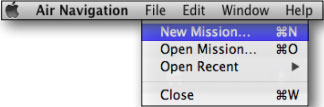
If you wish to create a new one by yourself, do this from the «File» top menu.

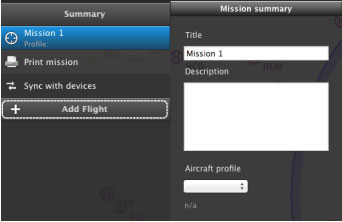
From the Mission TAB you will write the name of the mission and choose the aircraft profile once it is created.
You can also create one or more flights clicking on the “Add Flight” button.
Back to index
