Difference between revisions of "Map Store/de"
Jump to navigation
Jump to search


(Created page with "Das Map Store Modul besteht aus vier Teilen") |
(Created page with ";Installed products : Zeigt die Charts, Karten und Daten, die derzeit in der App installiert sind. Dient um Add-ons komplett oder teilweise zu '''re-installieren''' oder zu ''...") |
||
| Line 1: | Line 1: | ||
<languages /> | <languages /> | ||
| − | + | <br /> | |
| + | ---- | ||
| + | The Map Store module consists of 4 parts: | ||
[[File:MapStore_1.png]] (iOS) | [[File:MapStore_1.png]] (iOS) | ||
| Line 7: | Line 9: | ||
;Installed products | ;Installed products | ||
| − | : | + | : Zeigt die Charts, Karten und Daten, die derzeit in der App installiert sind. Dient um Add-ons komplett oder teilweise zu '''re-installieren''' oder zu '''entfernen'''. |
;All my products | ;All my products | ||
| − | : | + | : Hier werden alle Charts, Karten und Daten, die seit dem ersten Gebrauch von Air Nav Pro heruntergeladen und gekauft wurden angezeigt. Sie können ein zuvor gekauftes Produkt wiederherstellen lassen und es bis auf drei verschiedenen Geräten (Android und/oder iOS) synchronisieren. |
| − | ; | + | ;Katalog (iOS) / Download products (Android)
[[File:MapStore_2.png|caption|right|200px]] |
| − | : | + | : Der Katalog in iOS ist in zwei Teile geteilt: |
| − | * | + | *Nach Land: Sie können ein Land auswählen und alle verfügbare Add-ons für dieses Land werden angezeigt.
|
| − | * | + | *Nach Kategorie: Die Produkte werden nach Kategorie angezeigt (Anflugkarten, ICAO Charts, Höhendaten...).
|
<br /> | <br /> | ||
| − | : In Android | + | : In Android werden die Produkte nur nach Kategorie angezeigt. |
;Downloads / Download queue | ;Downloads / Download queue | ||
Revision as of 16:16, 1 December 2015
The Map Store module consists of 4 parts:
 (iOS)
 (Android)
- Installed products
- Zeigt die Charts, Karten und Daten, die derzeit in der App installiert sind. Dient um Add-ons komplett oder teilweise zu re-installieren oder zu entfernen.
- All my products
- Hier werden alle Charts, Karten und Daten, die seit dem ersten Gebrauch von Air Nav Pro heruntergeladen und gekauft wurden angezeigt. Sie können ein zuvor gekauftes Produkt wiederherstellen lassen und es bis auf drei verschiedenen Geräten (Android und/oder iOS) synchronisieren.
- Katalog (iOS) / Download products (Android)
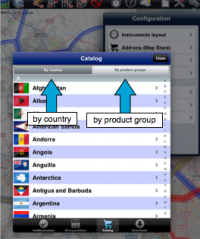
- Der Katalog in iOS ist in zwei Teile geteilt:

- Nach Land: Sie können ein Land auswählen und alle verfügbare Add-ons für dieses Land werden angezeigt.
- Nach Kategorie: Die Produkte werden nach Kategorie angezeigt (Anflugkarten, ICAO Charts, Höhendaten...).
- In Android werden die Produkte nur nach Kategorie angezeigt.
- Downloads / Download queue
- It lists current and pending downloads. This module is typically used to monitor download progression of a product. It is possible to reorder/delete the downloads or cancel all by pressing on the Edit button located on the upper left corner.

Installed products appear in different colours according to the state. In Android the background color changes, in iOS the dot next to the product name:
- White: maps are not installed;
- Green: maps are installed and up to date;
- Orange: new version available for download.


After a map or chart has been installed, you will be able to manage it from the «Map Options» module. Other products such as the Free Elevation data and the Geo-referenced approach charts will not show under «Map Options», but only under the «Installed products» part in the Map Store module.
Back to index (Android)
Back to index (iOS)
