Difference between revisions of "Translations:Install updates/1/en"
Jump to navigation
Jump to search
(Importing a new version from external source) |
(Importing a new version from external source) |
||
| Line 1: | Line 1: | ||
| − | |||
| − | |||
| − | |||
The red symbol will appear on both the bottom bar of the Map Store module and next to the product.
The reason for an update may be:
|
The red symbol will appear on both the bottom bar of the Map Store module and next to the product.
The reason for an update may be:
| ||
*A chart update that is part of your subscription is available;
| *A chart update that is part of your subscription is available;
| ||
| Line 15: | Line 12: | ||
#*
Free airspaces database | #*
Free airspaces database | ||
<br /> | <br /> | ||
| − | Then, on your iPad/iPhone:[[File:MapStore_5.png| | + | Then, on your iPad/iPhone:[[File:MapStore_5.png|right|caption|250px]] |
# Login with your User Account info under «Air Navigation Services»
(1) | # Login with your User Account info under «Air Navigation Services»
(1) | ||
# Make sure to have the option «Synchronize addons» enabled | # Make sure to have the option «Synchronize addons» enabled | ||
Latest revision as of 20:05, 14 October 2015
The red symbol will appear on both the bottom bar of the Map Store module and next to the product. The reason for an update may be:
- A chart update that is part of your subscription is available;
- We found an issue with the chart/data and we released a fixed version.
Waypoints and Airspaces
In order to get more frequent updates from the waypoints and airspaces databases, you should proceed as follows:
- Go to Xample Services
- Create a User Account
- Go to the Addons page
- SUBSCRIBE to:
- Free waypoints database
- Free airspaces database
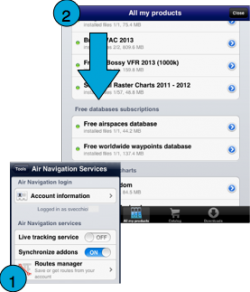
Then, on your iPad/iPhone:

- Login with your User Account info under «Air Navigation Services» (1)
- Make sure to have the option «Synchronize addons» enabled
- Go to «All my products»
- Download the Free Databases files. (2)
