Difference between revisions of "Map Store/es"
Jump to navigation
Jump to search
(Updating to match new version of source page) |
|||
| Line 2: | Line 2: | ||
<br /> | <br /> | ||
---- | ---- | ||
| − | + | El módulo «Map Store» ha sido totalmente modificado para facilitar su uso. | |
| + | Ahora luce como lo muestra la foto debajo y sigue siendo accesible desde el botón «Configuration». Está compuesto por 4 secciones: | ||
[[File:MapStore_1.png]] | [[File:MapStore_1.png]] | ||
Revision as of 20:46, 29 October 2015
El módulo «Map Store» ha sido totalmente modificado para facilitar su uso. Ahora luce como lo muestra la foto debajo y sigue siendo accesible desde el botón «Configuration». Está compuesto por 4 secciones:

- Installed products
- It shows the charts, maps and data that is currently installed in the app.
- All my products
- It shows all the purchased charts, maps and data and the free products downloaded by the user, too. If you reinstall the application or lose a map, here you will get it back. It also allows you to sync the products purchased on the Android version.
- Catalog
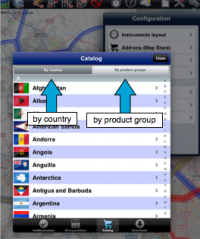
- It is divided into two parts:

- by country: you can choose the country you are interested in and it will show all the charts/maps and data available for that country.
- by product groups: it will show the products by their category.
- Downloads
- It lists current and pending downloads. This module is typically used to monitor download progression of a product. It is possible to reorder/delete the downloads or cancel all by pressing on the Edit button located on the upper left corner.
Back to index
