Difference between revisions of "Restore purchased maps and charts"
Jump to navigation
Jump to search

| Line 1: | Line 1: | ||
| + | <languages /> | ||
| + | <translate> | ||
| + | <br /> | ||
---- | ---- | ||
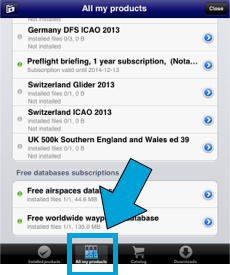
[[File:MapStore_3.png|left|caption|250px]]The button labeled <span style="color:#0000ff">'''«All my products»'''</span> reachable from the bottom bar of the module will display '''all the maps, charts and 3D data acquired by the user''' iTunes account from the very first time, no matter they were installed or not.
| [[File:MapStore_3.png|left|caption|250px]]The button labeled <span style="color:#0000ff">'''«All my products»'''</span> reachable from the bottom bar of the module will display '''all the maps, charts and 3D data acquired by the user''' iTunes account from the very first time, no matter they were installed or not.
| ||
| Line 10: | Line 13: | ||
---- | ---- | ||
Back to <u>[[Air Navigation iOS|index]]</u> | Back to <u>[[Air Navigation iOS|index]]</u> | ||
| + | <br /> | ||
| + | </translate> | ||
Revision as of 19:58, 13 October 2015

The button labeled «All my products» reachable from the bottom bar of the module will display all the maps, charts and 3D data acquired by the user iTunes account from the very first time, no matter they were installed or not. In order to re-install previously acquired maps, charts or 3D data, you can look into this module and press on the

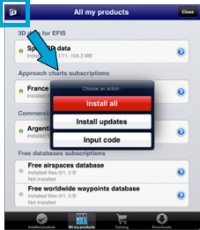
desired one to install it. You can also choose to install them all by pressing on the upper left corner button (see screenshot on the right).

You should Always use the same iTunes account.
The option Input code is still present for a product that was sold with a license code, such as the German VFR approach charts.
Back to index
