Difference between revisions of "Route synch/es"
Jump to navigation
Jump to search
(Created page with "Administrar rutas") |
(Created page with "<br /> ---- leyenda|rightLas rutas pueden ser importadas a la Cuenta de Usuario a través de Air Navigation Pro usando la opción '''«Administrar rutas...") |
||
| Line 2: | Line 2: | ||
<br /> | <br /> | ||
---- | ---- | ||
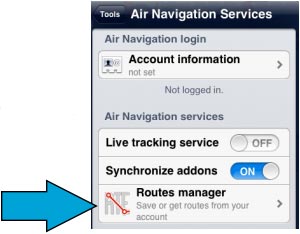
| − | [[File:routesync.jpg|leyenda|right]] | + | [[File:routesync.jpg|leyenda|right]]Las rutas pueden ser importadas a la Cuenta de Usuario a través de Air Navigation Pro usando la opción '''«Administrar rutas»''' desde el menu «Herramientas». |
Revision as of 12:24, 22 October 2015

Las rutas pueden ser importadas a la Cuenta de Usuario a través de Air Navigation Pro usando la opción «Administrar rutas» desde el menu «Herramientas».
If using a second device, with the same User Account, routes from on the server can be downloaded directly into that device through the «Routes manager» panel in Air Nav Pro.
The routes will be stored in the «Routes» tab of the left bar and they can be viewed displayed on the map and can also be downloaded as GPX files or KML files following the same procedure as with the flights.

Back to index
