Difference between revisions of "Translations:Chronometer/Alarm/2/es"
Jump to navigation
Jump to search

(Created page with "Presionando en: :- '''"UTC"''' cambiará el tiempo exhibido entre hora Local o UTC (Z). :- La pestaña '''"Chronometer"''' or '''"Alarm"''' cambiará su función. <br /> ==Cro...") |
|||
| Line 7: | Line 7: | ||
<br /> | <br /> | ||
* Puede '''COMENZAR''' el cronómetro tocando sobre el botón de "Play" (reproducir) ubicado sobre el lado izquierdo. | * Puede '''COMENZAR''' el cronómetro tocando sobre el botón de "Play" (reproducir) ubicado sobre el lado izquierdo. | ||
| − | * | + | * Cuando el "Stop Watch" está en marcha, tiene la opción para pausarlo con el botón "Stop" (detener) del lado izquierdo (al igual que el botón "Play"). |
| − | * | + | * Con el "Stop Watch" detenido[[File:stopedit.jpg|right|caption|180px]]puede escoger entre '''REANUDAR''' el el cronómetro presionando sobre el botón "Play" del lado izquierdo o '''REINICIAR''' el tiempo presionando sobre el botón con la flecha "Arrow" ubicada del lado derecho. |
| − | * | + | * Presionando en el botón "Pausar" del lado izquierdo cuando el "Stop Watch" está en marcha se activará la "Función Lap" (tiempo de vuelta). El tiempo seguirá corriendo pero se exhibirá el tiempo del momento en el que se presionó el botón "Pause" (tiempos parciales). |
<br/> | <br/> | ||
| − | + | Por debajo del "Stop Watch" se encuentra el indicador del tiempo transcurrido (ETE). Funciona como el "Stop Watch" pero exhibe las horas y los minutos, en vez de los minutos y los segundos. | |
Revision as of 11:29, 24 October 2015
Presionando en:
- - "UTC" cambiará el tiempo exhibido entre hora Local o UTC (Z).
- - La pestaña "Chronometer" or "Alarm" cambiará su función.
Cronómetro

Cuando el cronómetro está seleccionado por debajo de la hora encontrará dos contadores: Stop Watch y ETE.
- Puede COMENZAR el cronómetro tocando sobre el botón de "Play" (reproducir) ubicado sobre el lado izquierdo.
- Cuando el "Stop Watch" está en marcha, tiene la opción para pausarlo con el botón "Stop" (detener) del lado izquierdo (al igual que el botón "Play").
- Con el "Stop Watch" detenidopuede escoger entre REANUDAR el el cronómetro presionando sobre el botón "Play" del lado izquierdo o REINICIAR el tiempo presionando sobre el botón con la flecha "Arrow" ubicada del lado derecho.
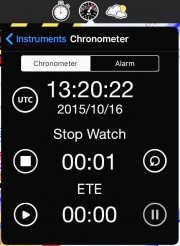
- Presionando en el botón "Pausar" del lado izquierdo cuando el "Stop Watch" está en marcha se activará la "Función Lap" (tiempo de vuelta). El tiempo seguirá corriendo pero se exhibirá el tiempo del momento en el que se presionó el botón "Pause" (tiempos parciales).

Por debajo del "Stop Watch" se encuentra el indicador del tiempo transcurrido (ETE). Funciona como el "Stop Watch" pero exhibe las horas y los minutos, en vez de los minutos y los segundos.
