Difference between revisions of "Translations:Map Store/5/en"
Jump to navigation
Jump to search

(Importing a new version from external source) |
(Importing a new version from external source) |
||
| Line 1: | Line 1: | ||
| − | [[File:mapstore4.jpg|caption|left|200px]][[File: | + | [[File:mapstore4.jpg|caption|left|200px]][[File:mapst.jpg|caption|right|100px]] |
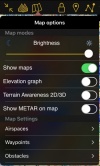
After a map or chart has been installed, you will be able to manage it from the «[[Map Options menu|Map Options]]» module. | After a map or chart has been installed, you will be able to manage it from the «[[Map Options menu|Map Options]]» module. | ||
Other products such as the Free Elevation data and the Geo-referenced approach charts will not show under «Map Options», but only under the «Installed products» part in the Map Store module. | Other products such as the Free Elevation data and the Geo-referenced approach charts will not show under «Map Options», but only under the «Installed products» part in the Map Store module. | ||
Latest revision as of 23:42, 8 March 2016


After a map or chart has been installed, you will be able to manage it from the «Map Options» module. Other products such as the Free Elevation data and the Geo-referenced approach charts will not show under «Map Options», but only under the «Installed products» part in the Map Store module.
