Import/Export GPX files (Routes)
Jump to navigation
Jump to search
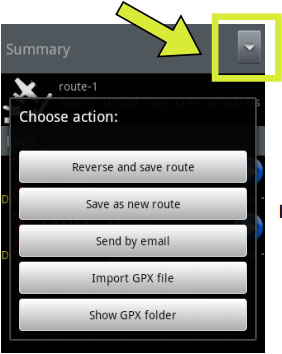

A Route in GPX format can be imported or exported from Air Navigation Pro.

In order to Export a Route, press on the upper-right button located in the «Route Module» panel, then select the option “Send by email”.
 You must first have an Email account configured on your device.
In order to Import a Route, you have 3 alternatives:
- Copy the GPX files directly into the folder advised by the button “Show GPX folder”. This folder will have all the Routes appearing in Air Nav Pro.
- Select “Import GPX file”, then you search for the GPX file and open it.
- Use the “Open with” feature from outside Air Nav Pro.


Note: As an alternative, you can send a GPX file (Route) to your Email box and then open it directly on your device using the feature “Open with”.
Back to index.
