Translations:Create custom waypoint/1/en
Jump to navigation
Jump to search

There are two ways of creating custom waypoints:
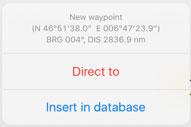
- By pressing your finger three seconds on a specific point in the map. Tap on "Insert in database" and enter the parameters asked by the app. If you select Aerodrome under "Type" you will be able to enter runways and frequencies information.

- The created waypoint will appear on the map and under "Tools - Custom Waypoints editor".
- By adding the exact coordinates or using your current position.

Going to "Tools - Custom waypoint editor".
